iOS 27.2 adds a second ATT prompt in the EU. What to check
In iOS 27.2, the App Tracking Transparency prompt gets a second form in the EU: a full-page, expanded version. In five countries it is the only form you can show, and it comes with a new method and a rule that you cannot ask the same user again for a year.
The rule for when you need to ask does not change. What changes is what the user sees and what your code has to call.
What Apple announced
Apple's announcement from September 16 says that, beginning with iOS 27.2 and iPadOS 27.2, developers have the option to use an alternative version of the ATT system prompt in the EU. It also says the requirements for when you must seek permission to track users stay the same.
The option becomes an obligation in some places. Apple's wording: due to legal requirements, only the alternative version of the system prompt is available for apps distributed in Germany, France, Italy, Poland and Romania. The iOS 27.2 RC release notes say the same from the system side: the alternative prompt is required for users in those five countries.
So the question for your app is not "do I need to ask". It is "which prompt will my users get, and does my code ask in a way that supports it".
The new call
The existing requestTrackingAuthorization call stays. Apple's reference documents a new one for iOS 27.2.0 and later:
requestTrackingAuthorization(preferExpandedInterface:additionalInformationAction:completionHandler:)
Three parameters matter:
preferExpandedInterfaceis aBool. It asks for the expanded prompt.additionalInformationActionis an optional closure. Apple's page says to passnilto omit the button. The "Additional Information" link only appears when you give the closure.completionHandlerreceives the usualATTrackingManager.AuthorizationStatus.
How the flag behaves depends on where the user is. Outside the EU, the method presents the system alert with your original NSUserTrackingUsageDescription, as before, and the new parameters have no effect. In the five countries above, the expanded prompt is shown regardless of what you set for preferExpandedInterface. In the rest of the EU, the flag is your option: Apple's reference lists these countries separately and says the full-page sheet is shown when preferExpandedInterface is true.
The two screens also differ in their buttons. The classic alert has "Ask App Not to Track" and "Allow". Apple's example image of the expanded sheet shows "Allow" and "Reject" instead.
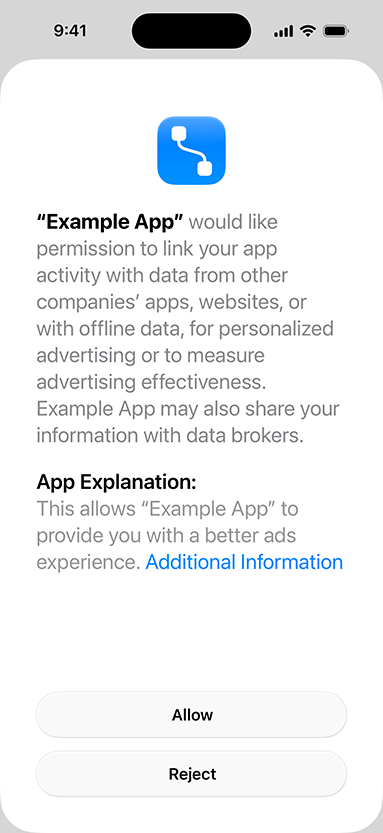
One more detail for the EU: the full-page sheet uses NSUserTrackingMarkdownUsageDescription if you define it. Apple's reference says it supports bold, italics, bullets and paragraphs.
Three details that are easy to miss
The yearly re-ask. Apple's reference says that after the user responds, the system notes the date and does not allow the prompt to display again until a year passes. The privacy page words it as being able to re-prompt a user one year after the previous choice, regardless of whether that choice was to accept or reject. The RC release notes list this as part of the same feature: re-prompting on a yearly basis for EU users.
The practical effect is that a second call inside that year is not a retry. If your code asks on every launch until it sees authorized, a user in the EU who has answered will not see the prompt again for twelve months, whatever the answer was. If you want to ask again after a year, you need your own record of when and why, and a place in your flow where asking again makes sense.
The "Additional Information" button. When you pass a closure, the prompt shows "Additional Information". In Apple's example image it is a blue text link at the end of the explanation, not a button at the bottom next to "Allow" and "Reject". Apple's reference says that when the user taps it, the sheet dismisses without recording an answer, your closure runs, and the completion handler is called with notDetermined, so you have to call the method again to get a decision. Whatever your closure shows, usually your own explanation screen, has to lead somewhere: back to the prompt, or to an explicit "not now". If you want the button, plan the screen first. If you do not, pass nil.
The rename. The RC release notes list a Resolved Issue: the API name changed during the beta, and the Objective-C name changed too. Code or blog snippets written against an early 27.2 beta can fail to compile for that reason. Check the parameter labels against Apple's reference page, not against a snippet you found earlier.
What to check this week
- Look at where you call
requestTrackingAuthorization. The sources I used do not say what the old call shows in the five required countries, so test that case rather than assume it. Decide whether you want the expanded form elsewhere in the EU too. - If you adopt the new call, remember it is iOS 27.2.0 and later. Keep your old call for earlier systems, behind an availability check.
- Decide on the Additional Information button before you write code. Passing
nilis a valid answer. - Look for loops that re-ask. Under the one-year rule, a second request in the same year does not show anything.
- Check your
NSUserTrackingUsageDescription. Outside the EU it is still the text users see in the system alert. For the full-page sheet in the EU, consider addingNSUserTrackingMarkdownUsageDescription, which supports bold, italics, bullets and paragraphs. - Test on a real device or a configuration where you can confirm the region behavior, rather than assuming it from reading. The sources I used describe the behavior but I have no first-hand test of it.
Apple's wording is careful about one more thing, so I will be too: nothing in these sources says you have to design a new screen. The change is the prompt format, the five required countries and the yearly rule.
iOS 27.2 reached release candidate status on October 19, together with Xcode 27.2 RC. The final release date is not stated in the sources, so treat this as a "soon" and read the RC notes for the ATT section before your next build.
Sources
- Apple Developer News: App Tracking Transparency changes in the EU (September 16, 2026) — alternative ATT prompt from iOS 27.2 and iPadOS 27.2, unchanged requirements, the five countries where only the alternative prompt is available
- User privacy and data use — Apple Developer — "ATT in the European Union" section: Additional Information button, re-prompt one year after the previous choice, example image of the expanded sheet with "Allow" and "Reject" buttons
- requestTrackingAuthorization(preferExpandedInterface:additionalInformationAction:completionHandler:) — Apple Developer Documentation — signature, iOS 27.2.0 availability,
nilomits the button, behavior outside the EU, in the five countries and in the rest of the EU,NSUserTrackingMarkdownUsageDescriptionfor the full-page sheet, answer not recorded on Additional Information, one-year rule - iOS & iPadOS 27.2 Release Candidate Release Notes — expanded prompt and yearly re-prompting for EU users, required in France, Germany, Italy, Poland and Romania, API rename in Resolved Issues
- Releases — Apple Developer — iOS 27.2 RC (24B115) and Xcode 27.2 RC (27B48), October 19, 2026